
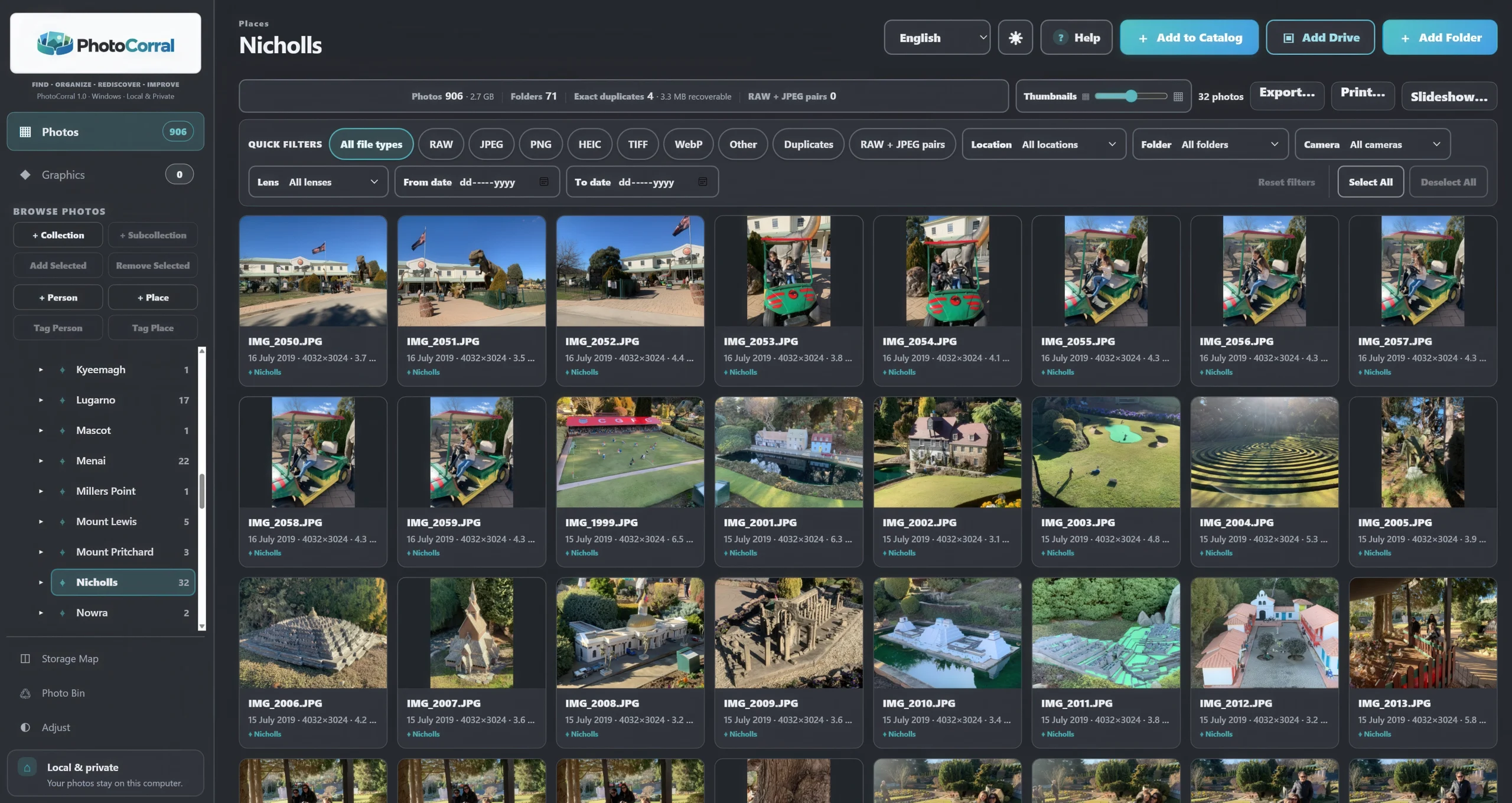
If you want to find photos by location on Windows, the information you need may already be hidden inside the photograph itself.
Can you find where a photo was taken without uploading it to a cloud photo service?
Yes. Many digital cameras and smartphones can store GPS coordinates inside a photograph’s metadata. A Windows photo organiser can read those coordinates, identify the place and organise photographs by location while keeping the photo library on your own computer.
With PhotoCorral, photographs containing GPS information can be organised into Places using local processing and offline geographic name resolution. That means coordinates such as latitude and longitude can become useful place names without requiring your photo catalogue to be uploaded to PhotoCorral servers.
This can turn thousands of apparently unrelated photographs into something much easier to explore: trips, countries, regions, cities and places you have visited over many years.
How Does a Photograph Know Where It Was Taken?
Many smartphones and GPS-enabled cameras can record the location where a photograph was taken.
This information is normally stored as metadata inside the image file.
Instead of containing only the visible photograph, the file may also contain information such as:
- The date and time the photograph was taken
- The camera or phone model
- Lens and exposure information
- Image dimensions
- GPS latitude
- GPS longitude
The GPS coordinates are particularly useful because they can identify a position anywhere on Earth.
The problem is that coordinates such as:
38.1938, 15.5540
are not particularly meaningful to most people.
You would much rather see a place name.
That is where geographic location resolution becomes useful.
What Is GPS Photo Metadata?
GPS photo metadata is location information stored alongside the image.
For example, when you take a photograph with a smartphone while location recording is enabled, the phone may save the latitude and longitude where the photograph was taken.
The picture itself does not visibly change.
The coordinates remain stored as information associated with the photograph.
A photo organiser can read that information and use it to help answer a much more useful question:
Where was this photograph taken?
Why Is Location Useful for Organising Photos?
Location is one of the strongest clues we have when trying to remember an old photograph.
You might not remember the filename.
You might not remember the exact date.
But you may remember:
“That was taken in Sicily.”
Or:
“Those photographs were from our holiday in France.”
Or:
“I took that picture somewhere near Sydney.”
Once photographs can be organised by Place, those memories become useful ways to rediscover them.
Folders and Places Are Not the Same Thing
You could create Windows folders for every country and city you visit, but that quickly becomes difficult to maintain.
A photograph may already be stored logically by year or event.
For example:
Pictures → 2025 → Summer Holiday
There is no reason to physically move the same photograph into another folder simply because it was taken in Italy.
A photo catalogue can keep the photograph associated with its existing storage while also allowing it to appear under a Place.
The same photograph can therefore be found by date, person, collection or location without creating another physical copy.
How PhotoCorral Organises GPS Photos by Place
PhotoCorral can read GPS information from supported photographs and use those coordinates to organise the catalogue geographically.
Instead of leaving you with raw latitude and longitude numbers, PhotoCorral can resolve those coordinates into human-readable places.
A photograph might therefore become associated with a geographic hierarchy such as:
Italy → Sicily → Messina
That makes browsing much more natural than searching coordinates manually.
Parent Places Can Contain Photos from Their Sub-Places
A geographic hierarchy becomes especially useful when you have travelled extensively.
If photographs are associated with several cities or localities within the same region, the higher-level Place can bring them together.
For example, selecting a country can give you access to photographs from the regions and localities beneath it rather than forcing you to open every individual location separately.
This allows Places to work at different levels depending on what you remember.
You might remember the exact city.
Or you may remember only the country.
Either can still be useful.
Can GPS Locations Be Identified Without the Cloud?
Yes.
GPS coordinates do not automatically contain names such as a city, region or country. Software needs geographic reference information to translate coordinates into useful names.
PhotoCorral includes an offline geographic resolver for this purpose.
This allows supported GPS coordinates to be translated into geographic names locally on the computer.
The benefit is that PhotoCorral does not need to send every photo location to an online mapping service simply to determine where the photograph was taken.
For people with large personal, family or travel archives, this provides another way to keep photo organisation local.
How to Find Photos by Location with PhotoCorral
Step 1: Add Your Photographs to the Catalogue
Use Add to Catalog to add supported photographs to PhotoCorral.
PhotoCorral builds its catalogue and analyses available metadata while leaving the original source files protected.
Step 2: Let PhotoCorral Read the GPS Information
If a photograph contains reliable GPS metadata, PhotoCorral can read the stored latitude and longitude.
You do not need to type the coordinates manually.
Step 3: PhotoCorral Resolves the Place
The stored coordinates can be matched against PhotoCorral’s offline geographic data so that useful location names can be created.
This turns technical coordinates into locations that make sense when browsing your photo collection.
Step 4: Open Places
Select Places in PhotoCorral to browse photographs geographically.
Instead of searching through Windows folders, you can begin with the country, region or locality you remember.
Step 5: Select a Place
Choose a Place to see the photographs associated with it.
The photographs may have come from different folders, dates, cameras or imports.
The common connection is simply:
they were taken in the same place.
What If a Photograph Has No GPS Information?
Not every photograph contains GPS coordinates.
This is completely normal.
Many traditional cameras do not have built-in GPS.
Older digital photographs may have been taken before location recording became common.
Scanned prints normally contain no original GPS information at all.
And photographs received through messaging or social-media applications may have had some metadata removed before you received them.
In those situations, PhotoCorral does not need to invent a location.
You can leave the photograph without a location or add the correct Place manually when you know where it was taken.
Why Guessing a Missing Location Can Be Dangerous
If reliable GPS information is missing, automatically guessing where a photograph was taken can create a misleading catalogue.
A file’s current folder does not necessarily tell you where the photograph was originally taken.
The date a file was copied to your PC does not reveal its geographic location either.
And photographs sent through messaging applications may have been saved or modified long after the original photograph was captured.
For those reasons, it is better to distinguish between a known location and an assumed one.
PhotoCorral allows photographs without reliable location information to remain unlocated until you decide to correct them.
Can You Add a Location Manually?
Yes.
If you know where a photograph was taken even though it contains no usable GPS information, you can assign the location manually.
This is particularly useful for:
- Old scanned family photographs
- Photos from cameras without GPS
- Images received from other people
- Photos whose metadata has been removed
- Historical photographs where you know the location personally
PhotoCorral can also reuse existing Place branches when you assign the same location again, helping prevent unnecessary duplicate Places from accumulating in the catalogue.
Can You Add the Same Location to Several Photos at Once?
Yes.
This is useful when you have a group of photographs from the same event or trip but the files do not contain location metadata.
Instead of editing every photograph individually, PhotoCorral’s date and location tools allow location information to be applied to multiple selected photographs.
For example, if you scanned 40 photographs from a family holiday in Rome, you can select the relevant photographs and apply the known location to the group.
What About Photos with a Date but No Location?
This is also common.
A photograph may contain a perfectly valid capture date but no GPS coordinates.
PhotoCorral provides a Needs Date and/or Location filter that helps identify catalogue items where one or both pieces of information still need attention.
This can be particularly useful when cleaning up a large archive gradually.
You do not have to fix thousands of photographs at once.
You can identify the incomplete ones and work through them when you have time.
Does Organising Photos by Place Move the Original Files?
No.
Places are part of the PhotoCorral catalogue organisation.
Adding a photograph to a Place does not mean creating a new Windows folder and physically moving the image there.
The same photograph can simultaneously belong to several useful catalogue views.
For example, one photograph could be:
- visible under a particular date;
- associated with several People;
- located under Italy → Sicily → Messina;
- included in a Holiday Collection;
- found later through another catalogue view.
It remains one photograph.
Why Location and People Work So Well Together
Sometimes you remember who was in a photograph.
Sometimes you remember where it was taken.
Often you remember both.
Imagine trying to find one photograph from a holiday many years ago.
You may remember:
“Daniela was in it, and we were in Sicily.”
A catalogue containing both People and Places gives you more than one way to approach the problem.
This is one reason cataloguing can become much more useful than relying exclusively on folders.
If finding photographs by person interests you, read our guide:
How to Find Every Photo of One Person on a Windows PC — Without Uploading Your Photos to the Cloud
Location Is Particularly Valuable for Travel Photography
Travel collections can become enormous.
A single holiday may produce hundreds or thousands of photographs, and after several years those trips begin to blend together inside a large photo library.
GPS information can restore useful structure automatically.
Instead of remembering which Windows folder contained a particular trip, you can explore the photographs geographically.
This can also reveal photographs you had forgotten.
You may open a country in Places looking for one image and rediscover an entire group of photographs from another trip.
What About Smartphone Photos?
Smartphones are one of the most common sources of GPS-tagged photographs.
If location recording was enabled when the photograph was taken and the metadata has been preserved, the file may contain accurate geographic coordinates.
However, the presence of GPS information should never be assumed.
Privacy settings can disable location recording, editing software can remove metadata, and messaging applications may strip metadata when photographs are shared.
That is why some photographs from the same phone may contain location information while others do not.
What About HEIC Photos from an iPhone?
Modern iPhones commonly use HEIC/HEIF for photographs.
PhotoCorral supports HEIC/HEIF images when the required Windows image support is available, and it can use available metadata from supported files as part of the catalogue.
The same principle applies: if reliable GPS metadata exists, it can help organise the photograph geographically. If the location metadata is missing, PhotoCorral does not need to invent it.
What About JPEG, TIFF, WebP and RAW Files?
Photo collections rarely contain only one file format.
PhotoCorral supports common photographic formats including JPEG, PNG, TIFF, HEIC/HEIF, WebP and supported RAW formats.
Whether location information is available depends on the metadata contained in the particular file and the way that file has been created, edited or shared.
File format alone does not guarantee that GPS information will be present.
Can I Correct an Incorrect Photo Location?
Yes.
Metadata can occasionally be incomplete or incorrect, particularly after photographs have been edited, copied between devices or processed by other software.
PhotoCorral provides tools for editing Date and Location information when you know the correct details.
Correcting catalogue information gives you control over how the photograph is organised rather than forcing you to accept incorrect metadata forever.
Can Location Organisation Stay Private?
Yes.
A location-based catalogue does not have to mean uploading your personal travel history or family photographs to a cloud photo service.
PhotoCorral is designed around local/private photo management.
Its catalogue, Places organisation and offline geographic name resolution are handled locally on the Windows PC.
This is particularly useful for people who want modern photo-management features while keeping control of their own photo library.
Frequently Asked Questions
How can I find photos by location on Windows?
If your photographs contain GPS metadata, photo-management software can read the latitude and longitude and organise the images geographically. PhotoCorral can use available GPS information to build Places in its local catalogue.
Can I find where a photo was taken from its metadata?
Sometimes. If the image contains GPS latitude and longitude, those coordinates can identify where the photograph was taken. Not every photograph contains this information.
Does every smartphone photo contain GPS information?
No. Location recording can be disabled, metadata can be removed during editing, and some messaging or social-media services may strip location information when an image is shared.
Can I organise photos by city or country?
Yes. When usable GPS information is available, a photo catalogue can translate coordinates into geographic names and organise photographs using a hierarchy of places.
Can I add a location if the photograph has no GPS data?
Yes. If you know where the photograph was taken, PhotoCorral allows location information to be assigned manually.
Does adding a Place move my photograph?
No. A Place is catalogue information. It provides another way to find the photograph without requiring you to reorganise the physical file into another Windows folder.
Can GPS photos be organised without uploading them to the cloud?
Yes. PhotoCorral performs its catalogue organisation and geographic name resolution locally on the Windows PC.
What if the GPS information is missing?
The photograph can remain without a location until you know the correct place. This is preferable to inventing location information that may be wrong.
The Real Advantage: Find Photos by Remembering Where You Were
A large photo collection becomes difficult when every search depends on remembering filenames and folders.
But that is rarely how people remember photographs.
You may not remember whether an image was called DSCF2841.JPG.
You may not remember which drive it came from.
You may not remember exactly which year folder contains it.
But you may remember:
“That was taken in Sicily.”
Location gives your photo catalogue another connection to your memory.
And when Places are combined with People, Dates and Collections, photographs that once seemed lost among thousands of files become much easier to rediscover.
More Guides for Organising a Large Windows Photo Collection
You may also find these PhotoCorral guides useful:
- How to Find Every Photo of One Person on a Windows PC
- How to Find Photos on Your PC When You Don’t Remember Where You Saved Them
- How to Organise Thousands of Photos on a Windows PC Without Losing Your Originals
Find Your Photos by People, Place, Date and More
PhotoCorral is a Windows photo organiser and editor designed to help you find and reorganise large photo collections while keeping the catalogue and analysis local to your PC.
It can help you browse photographs by People, Date, Places, Collections and visual content, while also providing RAW development, photo editing, metadata tools, export, printing, slideshows and other photo-management features.
You can also try the PhotoCorral Web Demo to see how the catalogue works.
PhotoCorral 1.0.30 is available for Windows 10/11 64-bit. The interface supports English, Italian, French, German and Spanish.
