
You remember the photograph — just not where it is
If you need to find old photos but cannot remember the folder or filename, people, place, date and even what appears in the picture can give you another way in.
You may remember exactly what the picture looks like, who is in it, where it was taken or roughly when it was taken — but not the filename, folder or drive.
That is where a catalogue becomes much more useful than folders alone.
Instead of relying on one path through your collection, PhotoCorral gives you several ways to find the same photograph again.
Find photos by person
Sometimes the easiest thing to remember is the person in the photograph.
PhotoCorral’s People section lets you organise recognised faces under named people and then browse the photographs associated with them.
That can be especially useful in a large family collection where photographs may have been taken over many years and stored in many different folders.
Instead of asking:
“Which folder did I put that photo of Susan in?”
you can simply go to People, choose Susan, and browse the photographs associated with her.
Find photos by place
Location can be another strong memory clue.
You may not remember the year, filename or folder, but you remember:
“That was taken in Sicily.”
or:
“That was during the trip to Rome.”
When reliable GPS location information is available, PhotoCorral can use it to organise photographs under Places.
Location information can also be corrected manually when necessary.
This gives you another route into the catalogue without changing where the original file is stored.
Find photos by date
Dates are useful when you remember approximately when something happened.
You may remember a birthday, holiday, wedding, trip or event even if you cannot remember the folder where the pictures were saved.
PhotoCorral’s By Date view lets you browse photographs chronologically using reliable capture-date information.
If a photograph has incomplete date information, the catalogue date can also be corrected manually.
This makes date browsing useful even for older collections that have been copied between computers or storage devices over the years.
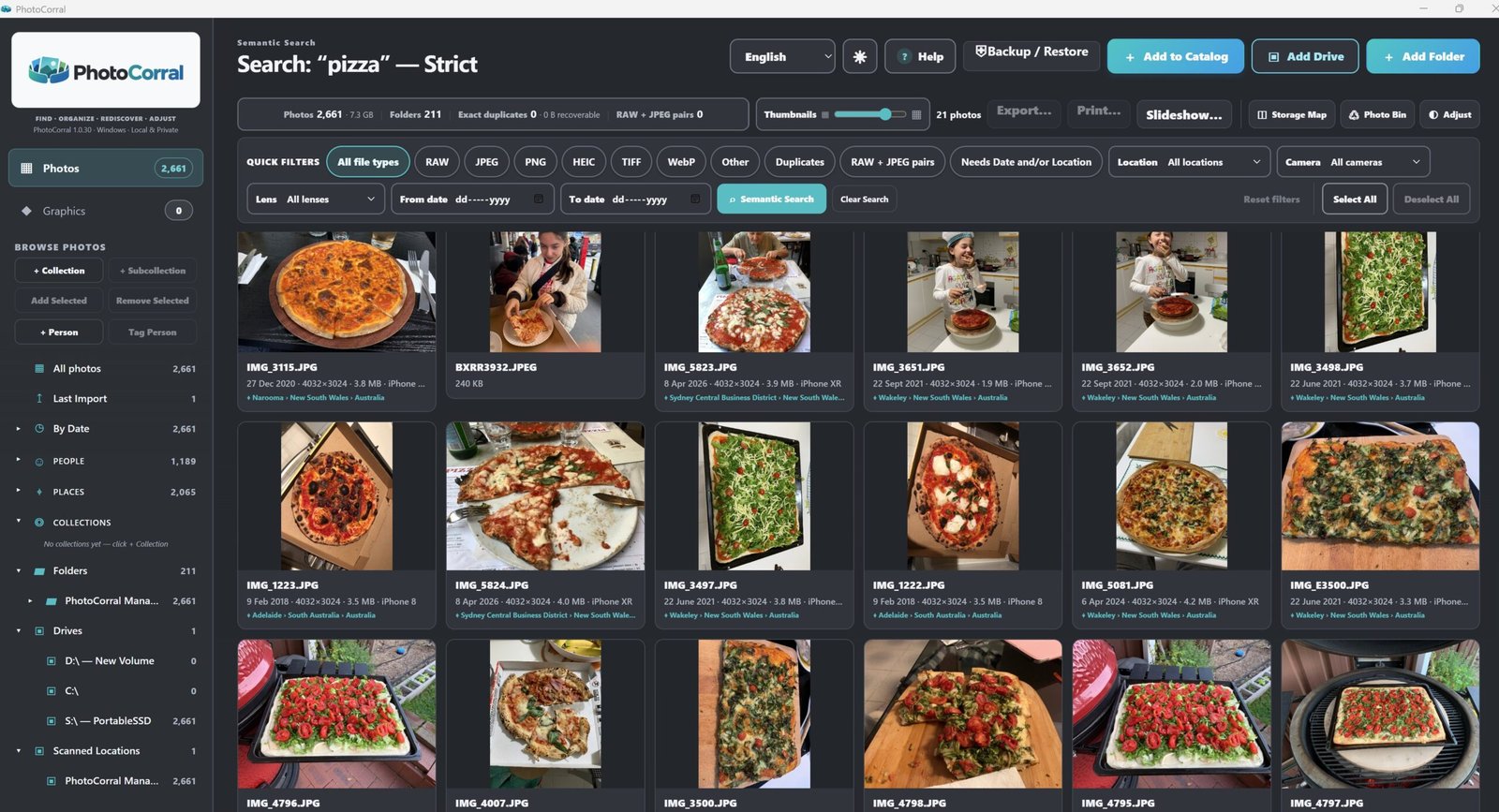
Find photos by what is actually in the picture
Sometimes you remember neither the person, place nor date.
You just remember the subject.
Perhaps you are looking for:
- a cake
- a dog
- a beach
- a car
- a passport
- a sunset
- a birthday table
- a particular kind of object or scene
PhotoCorral’s Semantic Search lets you search the catalogue using ordinary words that describe what appears in the photograph.
This creates a completely different way to explore a large photo collection.
You do not need to know the filename.
You do not need to remember the folder.
You can start with what you remember seeing.
Use more than one clue
The real advantage comes from having several different routes into the same catalogue.
A photograph might be found through:
People
because you remember who is in it.
Places
because you remember where it was taken.
By Date
because you remember when it happened.
Semantic Search
because you remember what appears in the photograph.
Collections
because you already grouped it with related photographs.
The same photograph can make sense in several of these views without needing several physical copies.
Why folders alone are often not enough
Folders are useful for storage, but they are limited as a memory system.
A folder can only exist in one physical location.
Your memory does not work that way.
You may remember a photograph by a person today, by a place next month and by an event next year.
That is why a catalogue with several discovery methods can become more useful as your photo library grows.
Your originals do not need to be reorganised every time
PhotoCorral’s organisation works through the catalogue.
You do not have to keep moving the original source files around just because you want a different way to find them.
That means you can improve how photographs are organised and discovered without constantly rebuilding the folder structure on your drives.
Local search keeps the catalogue private
PhotoCorral’s People recognition and Semantic Search are designed to work locally on your Windows computer.
Your photo library does not need to be uploaded to a cloud photo service simply to use these catalogue features.
For people who prefer to keep their photographs on their own computer and storage devices, that is an important distinction.
Start with the clue you remember
When you need to find an old photograph, do not begin by asking:
“Where did I save the file?”
Start with:
“What do I remember about the photograph?”
A person?
A place?
A date?
A subject?
Then use the part of the catalogue that matches that memory.
That simple change can make a large photo collection much easier to navigate.
Try the different ways of finding a photograph
The PhotoCorral Web Demo lets you explore sample photographs directly in your browser and try several of the same catalogue ideas, including People, Places, By Date and Semantic Search.
